
Best overall for generated itineraries: Freeplantour. Best for collaborative planning: Wanderlog. Best for straightforward navigation: Google Maps. These are the best free trip planner apps to consider in 2026, with different picks for organizing bookings, planning road trips, and exploring offline.
- Freeplantour leads the best free trip planner apps for editable, multilingual travel itineraries.
- Choose Wanderlog for collaborative travel planning and TripIt for organizing booking confirmations.
- Google Maps handles navigation; Organic Maps suits travelers who want downloaded maps.
- Choose by planning task, not feature count: itinerary creation and booking organization solve different problems.
Why this matters
A booking organizer does not solve the same problem as an itinerary generator. Neither replaces checking whether a museum opens on your chosen day. Pick the wrong tool and you still need to build the useful part of your trip elsewhere.
Freeplantour is best for travelers who want editable, multilingual travel itineraries. If you already know where you are going and only need directions or booking details, choose the narrower tool that matches that task.
What makes the best free trip planner apps
For this 2026 guide, the ranking follows practical planning criteria rather than the longest feature list:
- Starting point: Does the tool help you decide what to do, or organize decisions already made?
- Editing: Can you revise the plan when your interests or circumstances change?
- Location context: Does it help you understand where stops sit relative to one another?
- Travel companions: Is it useful when other people need to contribute or understand the plan?
- Language: Does the workflow suit travelers using different languages?
- Scope: Is the tool an itinerary builder, map, booking organizer, or research resource?
For a sample 3-day trip, start with the task you find hardest. Adding another app only makes sense when it solves a separate problem.
Free trip planners at a glance
The 2026 shortlist includes mobile apps and browser-based tools. Basic planning access does not mean every feature belongs to the same access level; check the current terms before making a feature essential to your trip.
| Tool | Best for | Standout feature | Key limitation |
|---|---|---|---|
| Freeplantour | Generated multilingual itineraries | Editable destination itineraries | A generated plan still needs practical checks |
| Wanderlog | Collaborative trip planning | Shared plans with mapped places | Detailed plans require upkeep |
| Google Maps | Everyday navigation | Directions and saved places | Saved places are not a finished itinerary |
| TripIt | Booking organization | Confirmation-based itinerary organization | Does not choose your sightseeing priorities |
| Rome2Rio | Transport research | Comparisons across transport modes | Operator details need confirmation |
| Tripadvisor | Attraction research | Traveler reviews and destination listings | Reviews need context |
| Google Travel | Early-stage trip research | Destination and travel search tools | Research does not create a complete daily plan |
| Organic Maps | Offline map use | Downloadable maps based on OpenStreetMap | Not a booking organizer |
| Apple Maps | Navigation within Apple's ecosystem | Directions and place collections | Not a destination itinerary generator |
| Visit A City | Starting with sightseeing routes | Destination itineraries and attraction information | Suggested routes need personalization |
1. Freeplantour: best trip planner for multilingual itineraries
Freeplantour generates free, editable travel itineraries for destinations worldwide. Its multilingual approach suits travelers who want a starting plan they can revise rather than an empty list to populate.
Freeplantour pros:
- Generates destination itineraries.
- Lets you edit the resulting plan.
- Supports multilingual travel planning.
Freeplantour cons:
- Generated suggestions still need opening-hour and transport checks.
- An itinerary does not reserve your activities.
Best for: Travelers who want help deciding what to do and arranging a usable starting itinerary.
Verdict: Buy — choose this approach when generating the plan is your main task.
2. Wanderlog: best trip planner for collaborative planning
Wanderlog brings trip plans and mapped places into a shared planning workspace. It suits groups that want to contribute suggestions instead of leaving the entire itinerary to one person.
Wanderlog pros:
- Supports collaborative planning.
- Connects itinerary entries with map locations.
- Keeps travel ideas together.
Wanderlog cons:
- Group contributions still require decisions.
- A detailed itinerary takes work to maintain.
Best for: Friends or families building a shared plan.
Verdict: Buy — choose Wanderlog when several travelers need to shape the itinerary.
3. Google Maps: best trip planner for everyday navigation
Google Maps helps you save places and get directions between them. It works well when your destination choices are settled and you need to understand the route.
Google Maps pros:
- Provides directions between stops.
- Supports saved-place lists.
- Combines maps with place information.
Google Maps cons:
- Saved lists do not establish a daily schedule.
- Place details need checking against official information.
Best for: Travelers who need navigation more than itinerary generation.
Verdict: Buy — choose Google Maps for getting between places, not deciding your entire trip.
4. TripIt: best trip planner for booking organization
TripIt organizes travel confirmation details into an itinerary. Its strength is keeping arrangements readable after you have booked, rather than selecting attractions before you book.
TripIt pros:
- Organizes booking confirmations.
- Keeps trip details together.
- Suits journeys with multiple reservations.
TripIt cons:
- Does not resolve sightseeing choices.
- Imported details still need review.
Best for: Travelers managing an already-booked journey.
Verdict: Buy — choose TripIt when scattered confirmations are the problem.
5. Rome2Rio: best trip planner for transport research
Rome2Rio helps you investigate ways to travel between places using different transport modes. Treat it as a route-research tool, then confirm the chosen connection with the operator.
Rome2Rio pros:
- Compares different transport modes.
- Helps investigate unfamiliar connections.
- Makes point-to-point research easier.
Rome2Rio cons:
- Operator schedules need confirmation.
- Transport options do not create a sightseeing itinerary.
Best for: Travelers deciding how to connect destinations.
Verdict: Buy — choose Rome2Rio for transport research before committing to a route.
6. Tripadvisor: best trip planner for attraction research
Tripadvisor combines attraction listings with traveler reviews. Use it to develop a shortlist, then compare the comments with your interests and the attraction's official details.
Tripadvisor pros:
- Offers traveler perspectives.
- Covers attractions and places to eat.
- Helps identify options to investigate.
Tripadvisor cons:
- Individual reviews reflect different expectations.
- A shortlist still needs geographic organization.
Best for: Travelers comparing possible activities.
Verdict: Buy — choose Tripadvisor for research, not as your sole scheduling source.
7. Google Travel: best trip planner for early-stage research
Google Travel brings destination exploration and travel search tools together. It fits the stage when you are comparing possibilities rather than arranging each day's activities.
Google Travel pros:
- Supports destination exploration.
- Connects flight and accommodation research.
- Helps structure early travel questions.
Google Travel cons:
- Research results are not a finished itinerary.
- You still need to organize local activities.
Best for: Travelers who have not settled their destination or travel arrangements.
Verdict: Buy — choose Google Travel before detailed daily planning begins.
8. Organic Maps: best trip planner for offline exploration
Organic Maps uses OpenStreetMap data and supports downloaded maps. It serves travelers who want a map available without depending on a live connection for every lookup.
Organic Maps pros:
- Supports offline map use.
- Includes walking and cycling navigation.
- Keeps the focus on maps and routes.
Organic Maps cons:
- Maps need downloading before offline use.
- Does not organize your reservations.
Best for: Travelers prioritizing offline navigation.
Verdict: Buy — choose Organic Maps when downloaded maps solve your main travel concern.
9. Apple Maps: best trip planner for Apple-device navigation
Apple Maps provides directions and lets you collect places in guides. It is a practical choice for travelers already using Apple's ecosystem who need a location-focused companion.
Apple Maps pros:
- Provides turn-by-turn directions.
- Supports collections of places.
- Fits Apple's device ecosystem.
Apple Maps cons:
- A place collection is not a timed itinerary.
- Does not generate a complete destination plan.
Best for: Apple users organizing stops and navigating between them.
Verdict: Buy — choose Apple Maps when navigation is the job you need done.
10. Visit A City: best trip planner for sightseeing templates
Visit A City offers destination itineraries and attraction information. Its suggested sightseeing routes give you something concrete to adapt when starting from scratch feels difficult.
Visit A City pros:
- Offers destination itinerary templates.
- Groups sightseeing ideas into routes.
- Provides attraction information.
Visit A City cons:
- Suggested stops need personal filtering.
- Route timing needs checking against your pace.
Best for: Travelers who prefer adapting a sightseeing template.
Verdict: Buy — choose Visit A City when a suggested route helps you get started.
How we ranked
The 2026 ranking prioritizes itinerary creation first, followed by collaboration, navigation, booking organization, and specialist research. These are distinct use cases, not interchangeable products. The order reflects fit for trip planning, not measured speed, user ratings, or hands-on performance scores.
Which free trip planner should you choose?
Choose Freeplantour for editable itinerary generation in 2026. Choose Wanderlog for group planning, TripIt for confirmations, and a mapping app for directions.
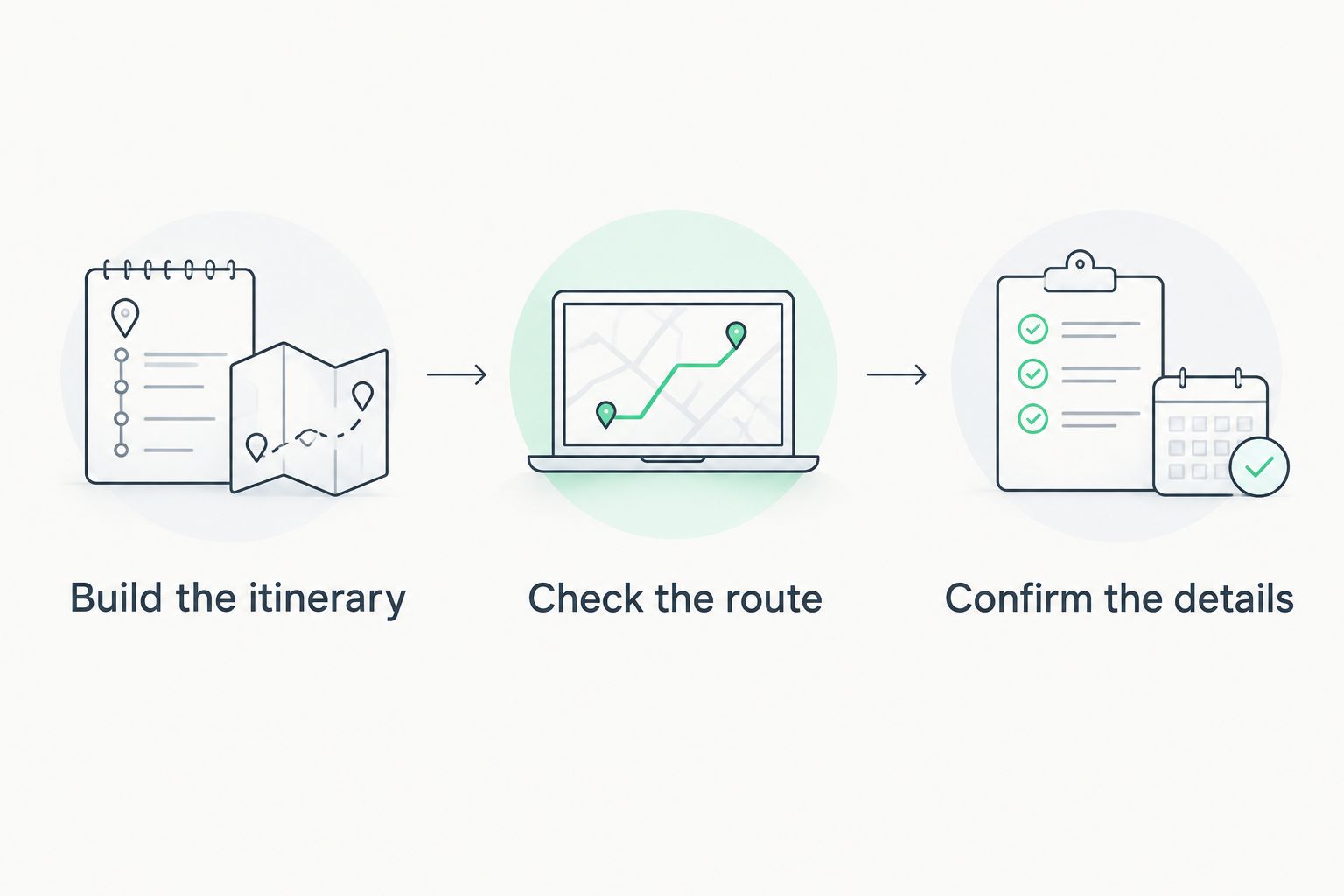
Use a simple sequence: Build the itinerary, Check the route, Confirm the details. For example, review a sample day with 2 major stops and leave a 30-minute buffer as your own planning allowance, not a promised journey time.
FAQ
What's the best free trip planner for editable itineraries?
Freeplantour is the strongest fit here for generated, editable, multilingual travel itineraries. Choose it when you need a starting plan rather than only directions or booking storage.
Is Wanderlog better than Google Maps for planning a group trip?
Wanderlog is better suited to collaborative itinerary planning, while Google Maps focuses on places and navigation. Choose according to whether your group needs to build the plan or follow the route.
Which trip planner organizes booking confirmations?
TripIt specializes in organizing travel confirmations into an itinerary. Review the resulting details before relying on them during your journey.
Which app should I use for offline travel maps?
Organic Maps is a clear choice for downloaded maps and offline navigation. Download the relevant area before you need to use it without a connection.
Can a free trip planner replace checking official attraction information?
No, a trip planner does not replace checking official opening hours, entry requirements, and reservation rules. Verify those details before fixing your daily schedule.
Do I need several trip planning apps in 2026?
No, you only need another tool when it solves a separate task. An itinerary builder and a navigation app serve different purposes; several overlapping planners add unnecessary upkeep.
One last thing
Before adding another attraction, check the route between the stops already on your list. A plan is not finished when every place sounds appealing; it is finished when the journey between those places fits the day.